


Summarise with AI:



Managing human resources is a crucial but time-consuming task for any organization. Ensuring smooth, compliant, and efficient HR processes for mid to large companies can be challenging. This is where Human Resource Management System (HRMS) software comes in.
HRMS automates tasks like hiring, payroll, performance management, and compliance. It makes managing HR easier as your company grows.
This blog will explore how custom HRMS software can benefit your business. We will cover the development process, cost factors, and tips for choosing the right software development team. By the end of this guide, you'll understand how a tailored HRMS can streamline your HR operations and help your company grow.
What is HRMS? A Breakdown of HR Software for Modern Workplaces
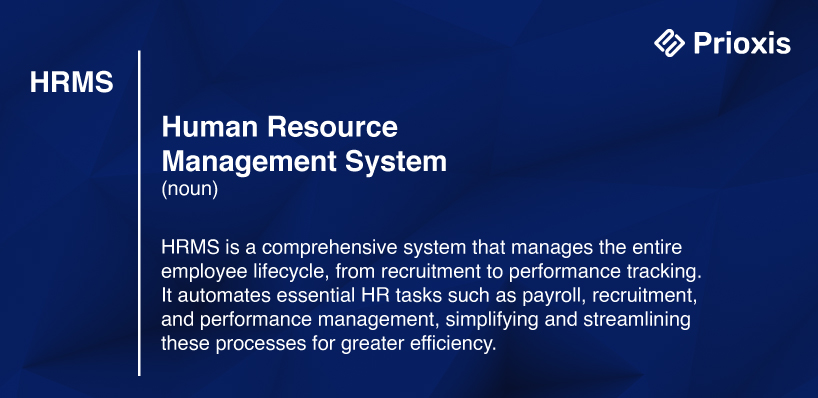
HRMS (Human Resource Management System) is software that helps manage many HR tasks, like recruiting, keeping employee records, payroll, performance tracking, and benefits.
It differs from HRIS (Human Resource Information System), which stores employee data. And HCM (Human Capital Management), which focuses more on managing people and talent. HRMS covers the entire employee journey—from hiring to tracking performance and paying employees.
By using an HRMS, companies can reduce the time spent on repetitive tasks. It also gives HR teams better tools to manage data, engage employees, and ensure compliance with laws. This makes HRMS a must-have for businesses looking to cut costs and make better decisions.
HRMS Software Growth: Why More Businesses Are Making the Switch
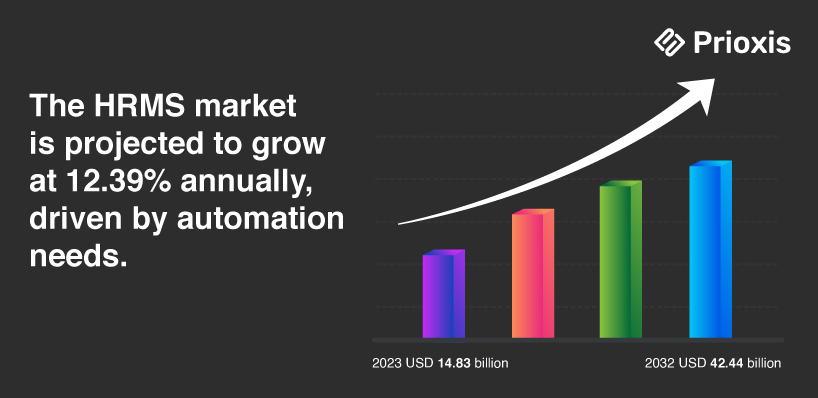
Over the years, HRMS software has become more popular due to new technologies, complex workforce's, and the need for data-driven decisions. Here’s a look at some stats that show how important HRMS has become:
In 2022, the HRMS market was valued at USD 14.92 billion. It's expected to grow to USD 33.40 billion by 2030, with a 12.2% annual growth rate. This growth comes from companies wanting to automate their HR processes.
80% of businesses utilize HR software, showing critical role of HRMS in modern workplace management.
Technological Advancements
Several key technologies have helped HRMS improve:
- Moving from Paper to Digital In the 1980s, companies like IBM started using digital systems to manage HR instead of paper. This improved efficiency by 50%
- Cloud Computing Cloud-based HRMS allows companies to access data in real time.
- Artificial Intelligence (AI) Companies like Unilever and Siemens use AI-driven HR systems to make recruitment faster and wiser. With AI tools, they've cut hiring times by 75% and 25% while improving the quality of new hires.
Employee Self-Service and Engagement
Today’s HRMS software also lets employees manage their information, request leave, and access benefits independently. This "self-service" feature has cut HR admin work, allowing HR teams to focus on more strategic tasks. It has also boosted employee satisfaction because workers have more control over their HR data.
Signs It’s Time for Your Business to Invest in HRMS Software
As businesses grow, HR processes become more complicated. Relying on manual systems can lead to inefficiency and mistakes. Here are signs that your business may need HRMS:
Growing Workforce
As your team gets bigger, tracking employee data and payroll manually becomes harder.
Compliance Issues
Keeping up with labor laws and other regulations is tough without help. An HRMS automates compliance and creates reports to avoid mistakes.
Multiple Payroll Systems
If your company has different payroll systems for different regions, an HRMS can merge them into one.
Data Inconsistencies
Struggling to keep employee information consistent across systems? An HRMS can fix this by centralizing all the data.
Problems HRMS Can Solve
Time-Consuming Admin Work
Automating payroll, hiring, and tracking performance saves time and reduces mistakes.
Lack of Real-Time Data
HRMS provides up-to-the-minute data, helping HR teams make quick, informed decisions.
Employee Dissatisfaction
Self-service tools give employees access to their own data, reducing delays and frustrations.
Custom vs Off-the-Shelf HRMS Software: Which Is Right for You?
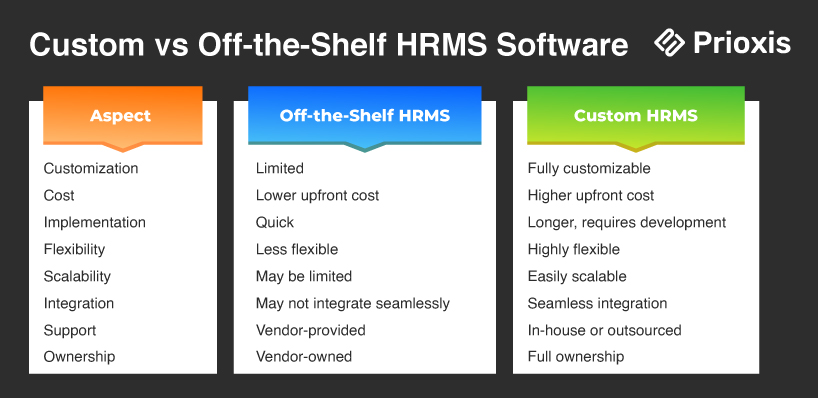
When choosing an HRMS, companies often face a decision: custom or off-the-shelf solutions. Let’s look at both.
Custom HRMS
Custom HRMS software is built specifically for your company. It costs more and takes longer to develop, but it offers maximum flexibility and can grow as your company expands.
Pros
- Tailored to your exact needs.
- Grow with your business.
- It integrates well with other systems like ERP and CRM.
Cons
- Higher upfront costs.
- Takes longer to develop.
Off-the-Shelf HRMS
These are ready-made systems that can be quickly set up. They are usually cheaper and faster to get started with.
Pros
- Faster to implement.
- Lower initial cost.
Cons
- Limited customization.
- May not integrate well with other systems.
- You might need to compromise on some features.
Choosing the Right Option
Whether you choose a custom or off-the-shelf HRMS depends on your business needs, budget, and how complex your HR processes are. If your business needs a highly customized solution, custom HRMS is worth the investment. For simpler needs, off-the-shelf options might be more cost-effective.
HRMS Development Process: How to Build Your Perfect HR Software
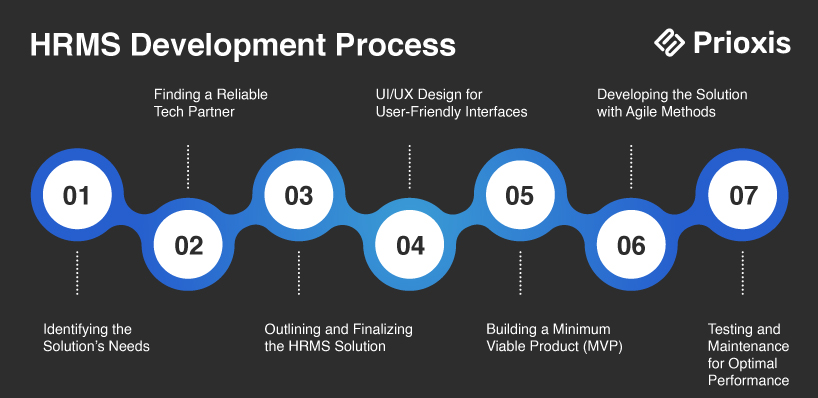
Building a custom HRMS requires careful planning. Here's a simplified step-by-step guide:
1. Identify the Solution’s Needs
Start by turning your basic idea into a detailed plan. Work with the HR team to list key features and problems the software will solve. Understanding users' needs is key to creating an effective solution.
2. Find a Tech Partner
Find a reliable tech partner if you don’t have an in-house team. Look for a development company with experience in HRMS projects. Check their skills, pricing, and client feedback to make sure they can meet your needs.
3. Outline the Solution
With your tech partner, finalize the details of the HRMS. Decide if the software will be web-based, mobile, or both. Discuss security measures to protect employee data. A clear outline will guide the development process.
4. Design the UI/UX
A simple, easy-to-use interface is crucial. Work with designers to create a user-friendly layout that meets the needs of HR and other employees. The system should be intuitive for everyone to use.
5. Build a Minimum Viable Product (MVP)
For larger projects, an MVP can help test core features. Get feedback from users to fine-tune the software before moving to complete development.
6. Develop the Solution
After the design and feedback are finished, the development team builds the software. Stay in contact with the team to make sure everything is on track and any adjustments are made quickly.
7. Test and Maintain the Product
Test the software thoroughly to fix any bugs and ensure security. After launch, set up a maintenance team to handle updates and future issues.
HRMS Software Features You Can’t Live Without
An HRMS (Human Resource Management System) offers several key features and functions that streamline HR tasks, improve efficiency, and reduce manual workload. Here's an overview of the essential features and functions:
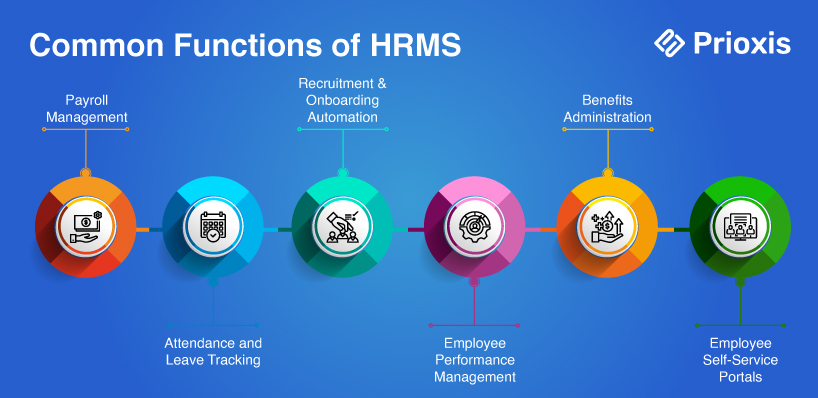
Recruitment & Hiring
Automates the hiring process with tools like Applicant Tracking System (ATS). Simplifies job postings, resume screening, and candidate evaluations, speeding up recruitment and reducing costs.
Employee Portal
Provides employees access to personal details, including job records, salaries, and benefits. It allows them to update information and request time off without needing HR assistance, saving time and improving accuracy.
Payroll Management
Automates salary calculations, tax deductions, and benefits administration. Ensures prompt, accurate payments and reduces payroll errors.
Workflows Automation
Streamlines repetitive HR tasks like approvals, notifications, and document submissions. This saves time and ensures consistency in HR processes.
Time Tracking and Leave Management
Tracks employee attendance, work hours, leave requests, and absences. Ensures accurate payroll processing and provides real-time data on workforce availability.
Performance Evaluation
Monitors employee performance through automated evaluations, goal setting, and feedback mechanisms. Helps HR and managers track progress, give feedback, and manage promotions.
Employee Training
Manages employee learning and development programs. Identifies skill gaps and tracks training progress to ensure continuous improvement and productivity.
Benefits Administration
Automates the management of employee benefits like healthcare, retirement plans, and other perks. Simplifies enrollment, tracks eligibility, and integrates benefits with payroll.
Talent Retention
Tracks employee performance and engagement, helping HR plan retention strategies. Predictive tools alert HR to potential resignations for proactive interventions.
Analytics and Reporting
Provides real-time data on employee performance, turnover, and workforce trends. Helps HR make data-driven decisions, improve management strategies, and enhance overall efficiency.
Self-Service Capabilities
Allows employees to manage their own information, request time off, and view their pay slips.
Compliance Management
Ensures companies stay compliant with labor laws and regulations. Automates compliance reporting and tracks updates in legislation to avoid penalties and legal issues.
Exploring the Different Types of HR Software: HRIS, HCM, and HRMS
Human Resource Information System (HRIS)
HRIS focuses on managing employee data and records. It helps with on-boarding, payroll, time tracking, and compliance. HRIS stores all employee information in one place, making it easy to manage and update. It also includes features like self-service portals, allowing employees to access their information without HR involvement.
Human Capital Management (HCM)
HCM includes all HRIS features but goes deeper by focusing on the employee’s entire journey within a company. It helps with talent acquisition, performance management, employee engagement, and optimization. HCM supports long-term employee development, retention, and succession planning, ensuring a smooth career path for employees while meeting organizational goals.
Human Resource Management System (HRMS)
HRMS is the most comprehensive HR software, combining HRIS and HCM functionalities. It also adds advanced features for payroll, time and attendance management, and labor tracking. HRMS automates administrative tasks while providing detailed productivity reports and analytics. This makes HRMS ideal for businesses looking to manage both employee data and operational efficiency at a deeper level.
The Benefits of HRMS: Why it is Your HR Team’s New Best Friend
Centralized Data Storage
HRMS allows organizations to store all employee information in one place. This makes managing large quantities of data more accessible and ensures accessibility across departments, reducing the risk of data loss or miscommunication.
Boost Efficiency and Productivity
By automating time-consuming HR tasks, HRMS enables HR staff to focus on more strategic work. The system’s insights can help ensure employees are placed in roles that improve efficiency and productivity.
Enhanced Employee Training and Self-Service
HRMS makes onboarding and training employees with access to online learning materials easy. Self-service features allow employees to manage their documents, training, and benefits, reducing HR’s workload.
Improved Hiring and On-boarding
HRMS systems streamline recruitment by centralizing candidate data, simplifying tracking, and automating on-boarding tasks. This reduces hiring time and costs while providing a better experience for new hires.
Streamlined Employee Management
HRMS simplifies workforce management by organizing employee roles, tracking leave requests, and automating payroll. It also provides employees with self-service options for scheduling and compensation, saving everyone time.
Fewer Errors
Manual data entry can lead to mistakes, especially with repetitive tasks. HRMS reduces human error in critical functions like payroll, benefits, and compliance, helping businesses save money by minimizing costly mistakes.
Simplified Compliance
HRMS ensures companies follow federal, state, and international regulations. This is especially useful when managing a workforce with varying labor laws across different locations.
Data-Driven Decision Making
HRMS systems provide real-time data to help businesses make strategic decisions. Organizations can improve recruitment, project planning, and employee retention strategies by analyzing workforce costs, performance, and turnover rates.
Keep Employee Data Safe: HRMS Software Security Features You Need
Securing an HRMS is essential to protect employee data and meet regulatory requirements. Here are the key areas to focus on:
Access Controls and Authentication
Strong password policies and regular password updates limit access to sensitive data. For added security, use multi-factor authentication (MFA) and apply role-based access to control who can view or change specific data.
Data Encryption and Protection
Encrypt sensitive data like Social Security numbers and bank details. Use 256-bit AES encryption for data protection. Ensure GDPR compliance and use SSL certificates to protect data during transmission.
Vulnerability Management
Keep HRMS software up to date with regular security patches. Conduct vulnerability tests to find risks and include security checks early in the software development.
Backup and Recovery
Backup HRMS data regularly and test the recovery process to ensure data can be restored. Store backups offline to protect against cyberattacks like ransomware.
Monitoring and Incident Response
Security tools are used to track threats. Develop an incident response plan to handle any data breaches quickly. Train employees regularly to recognize and avoid phishing and social engineering attacks.
Integration with Other Systems
Ensuring secure data transfers and consistency when connecting HRMS with other systems like ERP or finance tools. Proper documentation and staff training are essential for maintaining secure connections.
How HRMS Software Streamlines HR Tasks: A Quick Look
HRMS automates many tasks, making them easier for businesses to manage. Here's an example of how it works during an employee's on-boarding:
Input Employee Data
HR enters employee details during recruitment or on-boarding, including personal information, salary, and job roles.
Automate Tasks
The system automates routine tasks like payroll, leave tracking, and performance reviews. For example, when employees request leave, the system automatically updates balances and processes approvals.
Provide Self-Service Access
Employees securely log in to manage their profiles, request time off, view pay slips and update personal details without HR assistance.
Update in Real-Time
Any changes, such as promotions or attendance updates, instantly reflect throughout the system, ensuring data accuracy and avoiding manual errors.
Integrate Data Across Modules
The system links payroll, attendance, and benefits, so data updates automatically flow across all HR functions. Recorded hours impact payroll calculations, for example.
Generate Reports and Analyze Data
HR uses the system to create reports and analyze employee performance, attendance, and other key metrics for data-driven decision-making.
Monitor Compliance
The system tracks labor law compliance, updates regulations automatically, and alerts HR to needed actions or changes.
At every step, HRMS ensures data flows smoothly between departments, reducing the need for manual work.
HRMS Software Costs: What to Expect and How to Budget
Building or buying an HRMS can cost different amounts, depending on the features you need, the number of users, and the customization involved.
Factors That Affect Cost:
- Complexity of Features Advanced tools like AI or chatbots increase costs.
- Number of Employees The more employees, the higher the cost, as licenses and system ability increase.
- Customization Custom-built systems cost more because they take longer to develop and design for specific needs.
- Integration Needs Connecting HRMS to other tools, like ERP or payroll, adds complexity and cost.
How Custom HRMS Software Streamlined HR for Our Client
At Prioxis, we developed Hypex, an advanced Employee Attendance Management System for a UK-based company. Built with Flutter, it works seamlessly on Android and iOS platforms and offers an intuitive solution for managing attendance and work hours.
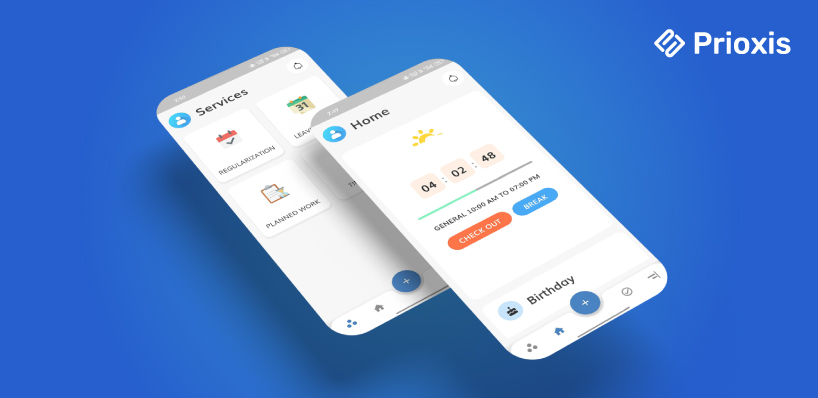
- Efficient Time Tracking Hypex automates attendance and time tracking, cutting manual errors. It ensures accurate logging of work hours and break times, providing real-time data.
- Self-Service for Employees Employees manage their schedules, check-ins, and leave requests directly through the app, reducing administrative work and giving them more control.
- Enhanced Administrative Control HR managers have centralized oversight to approve or decline leave requests, track attendance, and ensure compliance—all through a secure system.
- Scalable and Secure Using Microsoft Azure, Hypex offers a scalable, secure infrastructure ready to support future growth.
HRMS Software Trends: What’s Next in HR Tech?
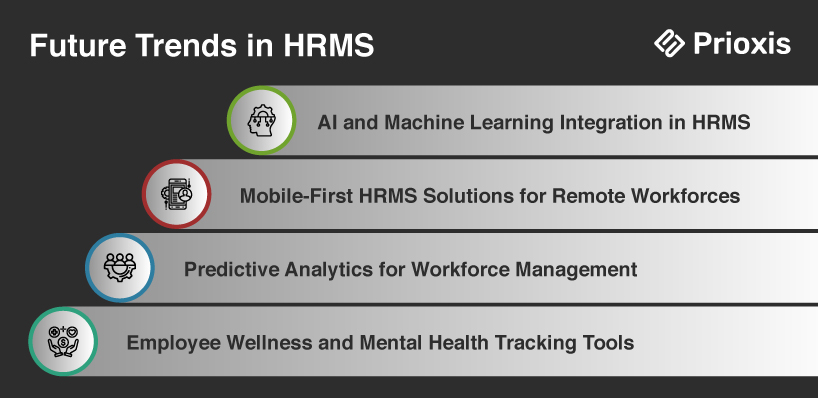
HRMS technology is constantly evolving. Here are some trends to watch:
- AI and Machine Learning AI is becoming part of HRMS, helping predict employee turnover and automate recruitment.
- Mobile-First HRMS Solutions As remote work becomes more popular, mobile access to HRMS is essential. Employees can manage HR tasks from their phones, boosting productivity.
- Advanced Analytics HRMS systems will continue offering predictive analytics, which will help companies make better hiring and workforce management decisions.
- Employee Wellness Tools More HRMS systems are adding tools to track employee wellness and mental health. This helps companies support a happier, healthier workforce.
Is Custom HRMS Software Worth It? Final Thoughts
HRMS software is key for businesses that want to simplify HR tasks, improve employee experiences, and follow regulations.
While off-the-shelf systems may be enough for smaller companies, custom HRMS provides the flexibility and scalability that larger businesses need. Investing in a custom HRMS can lead to big savings, better talent management, and improved efficiency.