


Summarise with AI:



Whether you are a solo developer or part of a seasoned DevOps team, if you want to build and survive in this AI era, you should start learning how to make use of AI in your day-to-day work. And you might have felt the heat of AI in DevOps roles.
Founders are now more focused on integrating AI in DevOps infrastructure, too, despite the fact that there are challenges with AI adoption in DevOps. However, the benefits it provides cannot be ignored. Teams are experimenting with AI in Azure DevOps with guardrails.
AI is excellent in script generation, error handling, and debugging, and there are so many areas in software development where it can eliminate the need for human professionals, though not fully.
These strategies will help you ship faster, improve security scans and code quality, and reduce manual operations.
What is Azure DevOps AI pipelines?
Some call it AI-driven, while others refer to it as “Agentic DevOps” that may leverage AI platforms, tools, or foundation technologies to optimize the software delivery. When AI is integrated into DevOps workflow automation, it turns static processes into adaptive ones. Intelligent automation is one of the benefits of using AI in DevOps services.
Developers use it in DevOps for troubleshooting, forecast the likelihood of system failure, accelerated testing, and so on. It is good at debugging, error analysis, script generation, finding config guides, and so on.
Benefits:
- AI-driven log analysis to pinpoint problems
- Personalized tips to resolve errors faster
- Easily integrates with Azure DevOps for smooth operation
- Continuous updates for better functionality
Why do I need to optimize Azure DevOps pipelines with AI?
It accelerates testing, saving hours of effort. Professionals working under tight deadlines are more likely to miss errors during analysis — they can leverage the velocity AI provides. There are plenty of common issues that AI can handle effectively, such as:
- Testing issues
- Code optimization challenges
- Errors or missed opportunities
- Challenges in collaboration
For technical teams, these common issues act as blockers, being the common reason for project delays and rising costs. AI provides the velocity a development team needs today.
Gartner predicts that by 2030, 75% of IT work will be augmented by AI. Today, it is hard to imagine software development without AI tools and platforms. For DevOps teams, knowing where and how to use AI is of utmost importance. Below is how the dev team can benefit from AI-driven DevOps pipeline optimization.
Applications of AI in DevOps pipeline optimization
Azure offers several AI-powered tools for DevOps, such as GitHub Advanced Security (GHAS), Managed DevOps Pools, plus natively integrates with Copilot. Here’s what you can unlock with AI in DevOps.
1. Automating repetitive tasks with AI
In any DevOps environment, there are countless repetitive tasks, such as running tests, assigning code reviewers, and managing pull requests. AI can automate these tasks.
For instance, AI in Azure DevOps analyzes your codebase and suggests who should review it based on past performance and expertise. It can even automate testing, ensuring that only the necessary tests are run—saving time and resources.
Example: Instead of manually selecting tests, AI analyzes the code and runs only the relevant tests, skipping unnecessary ones, thus speeding up your testing cycle.
In Azure DevOps, you can automate the assignment of code reviewers based on the nature of the changes. Here's an example of how to configure automated reviewer assignment using YAML in Azure Pipelines:
trigger:
- main
pool:
 vmImage: 'ubuntu-latest'
steps:
- task: Reviewers@1
 inputs:
   path: 'path/to/code'
   rules:
     - reviewers:
         - devteam@example.com
         - teamlead@example.com
       when: "changeInCode == true"
This YAML code snippet assigns specific team members as reviewers whenever there’s a significant code change in the designated path. Automating this process helps ensure that the right experts are reviewing your code.
2. Improving code quality with AI-powered insights
Azure DevOps uses AI to scan your code for potential issues. It flags code vulnerabilities or inefficiencies before they become a problem. This is especially useful in detecting technical debt—areas of the code that need improvement or refactoring to avoid future headaches.
Example: AI can detect overly complex code that could lead to bugs in future updates, recommending that developers simplify their logic or adopt azure best practices.
Azure DevOps allows you to integrate static code analysis tools like SonarQube, which uses AI to detect code quality issues. Here’s an example of how to include SonarQube in your Azure Pipelines:
trigger:
 branches:
   include:
     - main
     - lab
pool:
 vmImage: 'ubuntu-latest'
variables:
 - group: your-secret-group
 - name: your-environment
stages:
 - stage: Plan
   jobs:
     - job: Plan
       steps:
         - task: SonarQubePrepare@4
           inputs:
             SonarQube: 'SonarQube connection'
             projectKey: 'project-key'
             projectName: 'project-name'
         - task: SonarQubeAnalyze@4
         - task: SonarQubePublish@4
           inputs:
             projectKey: 'project-key'
This will automatically analyze your codebase for vulnerabilities, bugs, and maintainability issues, generating a detailed report of code quality.
3. Predictive analytics for risk management
By combining Azure Machine Learning with Azure DevOps, you can create a predictive analytics model for risk management. This helps you forecast build failures, identify potential bottlenecks, and make data-driven decisions about your release pipeline.
This approach is valuable for technical stakeholders managing complex development pipelines, as well as non-technical decision-makers who want to ensure that software is delivered reliably and without risk.
In this example, we'll build and deploy a simple machine learning model using Azure Machine Learning to predict potential risks in code releases based on historical build data.
4. Training the machine learning model
First, you'll need to train a machine learning model using historical data (e.g., previous builds, test results, bug reports). Here is a Python code snippet for training a model to predict build failures.
from azureml.core import Workspace, Experiment
from azureml.train.automl import AutoMLConfig
from azureml.core.dataset import Dataset
# Connect to Azure ML workspace
ws = Workspace.from_config()
# Load the historical build data
dataset = Dataset.get_by_name(ws, name="build_data")
# Set up AutoML for classification (predicting failure or success)
automl_config = AutoMLConfig(
   task="classification",
   training_data=dataset,
   label_column_name="build_status", # Column that indicates build success/failure
   primary_metric="accuracy",
   experiment_timeout_minutes=30,
   max_concurrent_iterations=5,
)
# Submit the experiment
experiment = Experiment(ws, "build_failure_prediction")
run = experiment.submit(automl_config, show_output=True)
# Best model selection
best_run, best_model = run.get_output()
# Save the model for future use
best_model.register(ws, model_name="build_failure_predictor")
In this code:
- Dataset This is historical build data with features such as code complexity, number of changed files, test results, and a target column ("build_status") that indicates success or failure.
- AutoML This automates the model training process to find the best model for classifying whether future builds might fail.
5. Deploying the model for real-time risk prediction
Once your model is trained, you can deploy it as a web service to integrate it with your Azure DevOps pipeline.
from azureml.core.model import Model
from azureml.core.webservice import AksWebservice, AksCompute
# Load workspace and model
ws = Workspace.from_config()
model = Model(ws, 'build_failure_predictor')
# Define deployment configuration for Azure Kubernetes Service (AKS)
aks_config = AksWebservice.deploy_configuration(cpu_cores=1, memory_gb=2)
# Create or attach existing AKS cluster
aks_target = AksCompute(ws, "aks-cluster")
# Deploy the model to AKS
service = Model.deploy(
   workspace=ws,
   name='build-failure-predictor-service',
   models=[model],
   deployment_config=aks_config,
   deployment_target=aks_target,
)
service.wait_for_deployment(show_output=True)
print(f"Service deployed at: {service.scoring_uri}")
Now the model is deployed as a web service. Azure DevOps can call this service before each release or during the build process to assess the likelihood of failure.
6. Making predictions in the DevOps pipeline
You can now add a step to your Azure DevOps pipeline to query the machine learning model and predict potential build failures or risks.
Here’s an example of how to call the deployed service from within your pipeline:
trigger:
- main
pool:
 vmImage: 'ubuntu-latest'
steps:
- task: AzureCLI@2
 inputs:
   azureSubscription: 'YourAzureSubscription'
   scriptType: 'bash'
   scriptLocation: 'inlineScript'
   inlineScript: |
     # Call the deployed model for prediction
     prediction=$(curl -X POST 'http://<service_scoring_uri>' -H 'Content-Type: application/json' -d @build_data.json)
     echo "Build risk prediction: $prediction"
     # If the risk is high, fail the build
      if [[ "$prediction" == *"high_risk"* ]]; then
       echo "High risk detected, stopping the build."
       exit 1
- Curl Command It sends the build data (e.g., test results, number of lines changed, etc.) to the deployed model API for analysis.
- Decision Logic If the model predicts high risk, the build process is automatically halted to prevent risky code from progressing further in the pipeline.
7. Enhancing security with AI scans
Application security is crucial, especially for businesses handling sensitive customer data. AI scans your code for security vulnerabilities, such as exposed passwords or outdated libraries, and recommends the best actions to mitigate these risks.
Example: If AI detects a potential security vulnerability (e.g., an outdated dependency), it will suggest upgrading to a more secure version before your application goes live.
# Install Azure CLI
az security assessment create --name "VulnerabilityCheck" \
 --type "SQLInjection" \
 --resource-group "your-resource-group" \
 --resource "app-service"
# Perform security assessment
az security assessment list \
 --resource-group "your-resource-group"
This command will automatically check for vulnerabilities in your Azure-hosted applications and recommend patches or security upgrades.
8. Optimizing CI/CD pipelines
Continuous Integration and Continuous Deployment (CI/CD) pipelines are the backbone of modern software delivery. AI can optimize these pipelines by:
- Predicting Pipeline Failures AI identifies patterns that may lead to failed builds or tests.
- Optimizing Resource Allocation It allocates the necessary computing resources to ensure pipelines run smoothly, reducing downtime.
Example: If Azure DevOps AI notices that certain tests frequently cause pipeline failures, it will alert developers to investigate and fix the issue, preventing repeated delays.
Here's how you can incorporate a machine learning model for pipeline optimization:
from azureml.core import Workspace, Model
from azureml.core.compute import AmlCompute
from azureml.core.webservice import AksWebservice
# Load Azure ML Workspace
ws = Workspace.from_config()
# Load pre-trained model
model = Model(ws, 'pipeline-optimizer')
# Set up web service configuration
aks_config = AksWebservice.deploy_configuration(cpu_cores=2, memory_gb=8)
# Deploy the model
service = Model.deploy(ws, "pipeline-optimization", [model], aks_config)
service.wait_for_deployment(show_output=True)
print(f"Model deployed at: {service.scoring_uri}")
Here, a pre-trained model is deployed to optimize your Azure DevOps pipeline by predicting failures based on past data. This helps DevOps teams avoid bottlenecks in the development process.
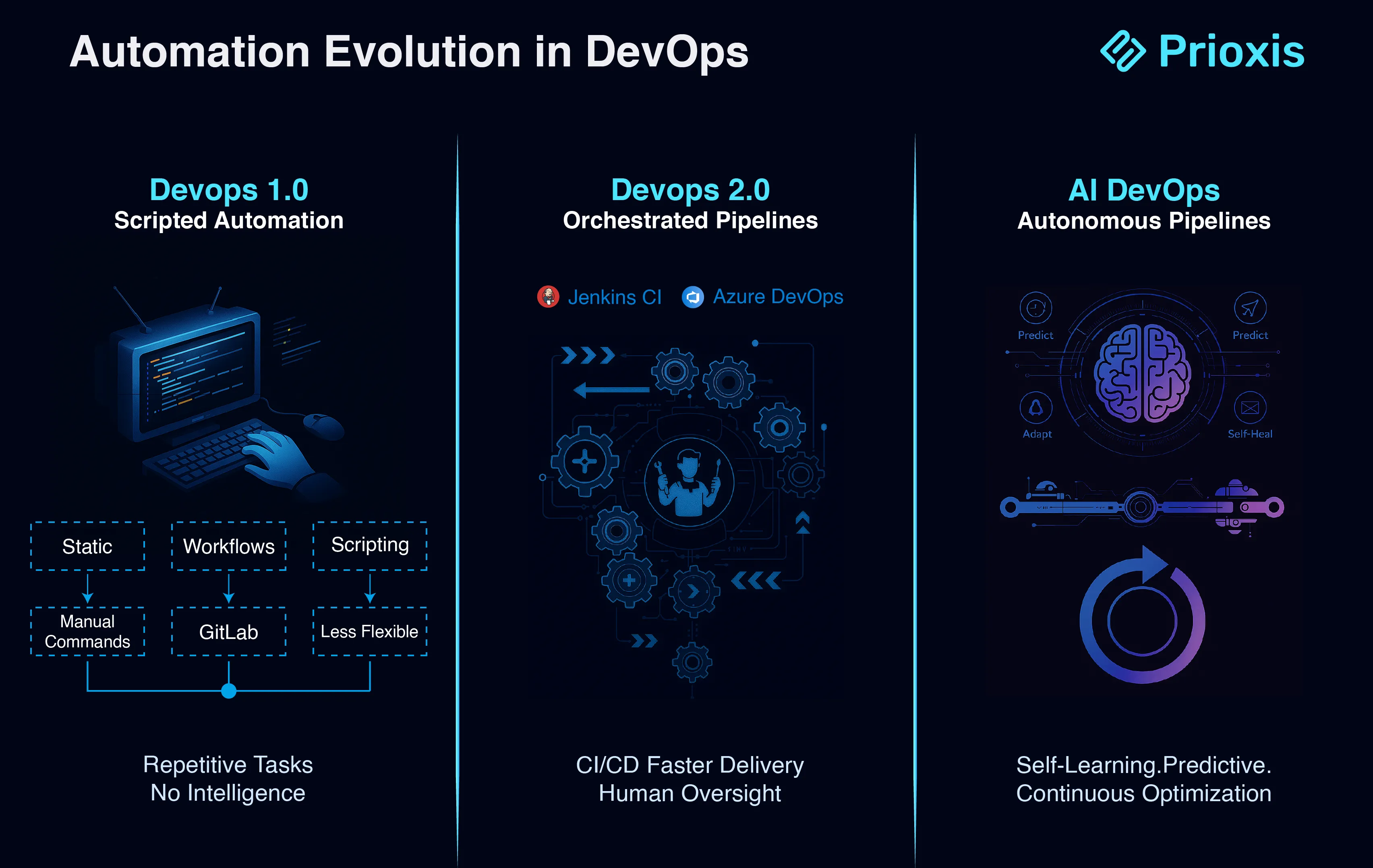
DevOps AI vs. traditional DevOps automation
Most teams already use automation to run builds, tests, and deployments. But when it comes to monitoring, incident handling, or performance optimization, traditional DevOps still relies heavily on manual intervention.
AI changes that. By adding machine learning models to your CI/CD workflow, you move from scripted automation to autonomous pipeline management where decisions are made in real time based on data, not rules.
Here’s how the shift looks in practice:
| Area | Traditional DevOps | AI-Driven DevOps (AIOps) |
|---|---|---|
| Automation | High, but still needs manual input to monitor and respond to issues | Autonomous. AI triggers actions based on live pipeline signals and historical patterns |
| Failure Detection | Reactive. Engineers investigate after something breaks | Predictive. Models flag risk areas before the pipeline fails |
| Alert Noise | Dozens of logs and alerts need human triage | AI filters out non-issues and highlights what actually matters |
| Code Health | Static tools catch surface-level issues | AI reviews changes based on context, past bugs, and team-specific patterns |
| Scaling Builds | Resources scaled manually or through scheduled triggers | AI adjusts runners or agents dynamically based on usage and performance trends |
This is not about replacing DevOps, it’s about making it smarter. With AIOps, your Azure DevOps pipelines learn, adapt, and respond faster than any manual system could.
Benefits of optimizing Azure DevOps pipeline with AI
Most DevOps teams have already automated their pipelines. But automation follows rules, it does not learn, adapt, or prioritize. That’s where AI makes a meaningful difference.
By applying AI within your Azure DevOps pipeline, you shift from task-based automation to intelligence-driven optimization. The result is faster releases, fewer manual interventions, and more stable delivery cycles.
- Early detection of Pipeline failures AI systems analyze historical builds and test data to flag patterns that typically lead to failed deployments. Instead of reacting to a broken pipeline, you catch issues before they reach critical stages.
- Smarter test execution Rather than rerunning every test on every commit, AI identifies which parts of the code have changed and runs only the tests that matter. This significantly reduces cycle time without compromising coverage.
- Efficient use of build resources AI tracks usage trends and adjusts build agents or execution order dynamically. This avoids unnecessary workloads and helps you get more out of your existing infrastructure or cloud spend.
- Cleaner Alerting and Prioritization Not every warning needs a human response. AI helps filter out low-impact alerts and highlights only the issues that are likely to affect your release, helping teams focus on what truly matters.
- Context-Aware Code Review Assignment AI can recommend reviewers based on file history, expertise, and past involvement. This not only improves review quality but also avoids overloading a few team members while others stay idle.
- Proactive Quality and Security Checks Machine learning models can go beyond static scans by flagging risky code patterns, outdated dependencies, or inconsistent versioning before the code is merged or released.
- Improved Release Decision-Making AI can assess the readiness of a build for deployment based on test history, code stability, and prior incidents. This supports safer rollouts and makes it easier to automate rollback decisions when needed.
The result
By implementing AI in Azure DevOps, businesses—both technical teams and decision-makers—can experience significant improvements:
- Faster release cycles Automating repetitive tasks means developers can focus on what matters: innovation.
- Reduced technical debt Addressing code issues early leads to better performance and fewer bugs.
- Enhanced security Proactive scans and AI-driven recommendations protect your applications from vulnerabilities.
- Improved team collaboration Personalized AI insights guide team members to the right tasks, reducing delays and enhancing communication.
Final thoughts
AI is no longer a futuristic concept. It’s here, and it’s transforming how companies manage software development. Whether you lead a development team or manage business outcomes, integrating AI into your Azure DevOps pipeline can make your business more efficient, competitive, and secure.
Ready to take the next step? Implementing AI-driven insights in Azure DevOps can significantly accelerate your development process while minimizing risks. Reach out to our team of DevOps experts today to explore how you can optimize your DevOps pipelines with AI and drive success in your organization. Contact us to start your journey toward faster, smarter software delivery with Azure DevOps and AI.