


Summarise with AI:



Your engineers can write the most elegant, secure code in the world, but it holds no real value as long as it is in the staging. Software deployment is the process of moving code into the hands of live users. If that handoff is slow, or manual, you are wasting prime engineering hours.
Splunk and Dotcom-Monitor highlights that poor software deployment creates financial liabilities, as companies lose an average $300 million a year to unplanned outages due to sloppy deployment practices.
Talking about software built for scale, you cannot just turn it off for an hour. Hundreds of thousands of users might be using it at that exact second.
This guide covers practical deployment strategies in 2026 and defines standard practices. We further explore the operational impact of automation.
What is Software Deployment?
Deployment is how software moves to the real environment, or production. The deployment ritual or foundational steps are the same: devs team release, install, and test. But the deployment is executed keeps changing as new tech emerges. Modern mechanism is radically faster and smarter than it used to be.
Production is fast, but delivery is not as fast as developers ships code today. Enterprise readiness isn’t determined by how fast you can hit a deploy button. It all comes down to visibility and speed: knowing what the code changes, what data it overwrites, and how quickly it can be rolled back when it fails. It shouldn’t be rigid process.
At Prioxis, we don’t do rigid release structure. Instead, our engineers navigate using these three filters.
- Building a practice environment that acts as exactly like the real world.
- Testing our updates in a messy, realistic environment before launch.
- Shifting live user traffic to the new build incrementally using strategies like canary or blue-green rollouts
A standard playbook lets you de-risk deployment. The playbook should outline a deployment framework set by seniors/experts in your organization along with how to leverage current platforms to put our pipeline on autopilot.
Automation handles many core activities such as artifact building, baseline testing, provisioning and configuration, eliminating hours of tedious manual effort. Automation replace several manual habits. However, when a release fails, a real person still has to answer The right response to delivery pressure is not to say no to fast releases, but to move with a tiered level of control.
The Most Popular Deployment Strategies
1. Basic Deployment
Basic deployment, which is also referred to as big bang deployment, involves deploying the complete application at once. The deployment strategy is easy, but it comes with risks since any issues encountered will affect all users at once. Basic deployment can be applied on small projects.
2. Rolling Deployment
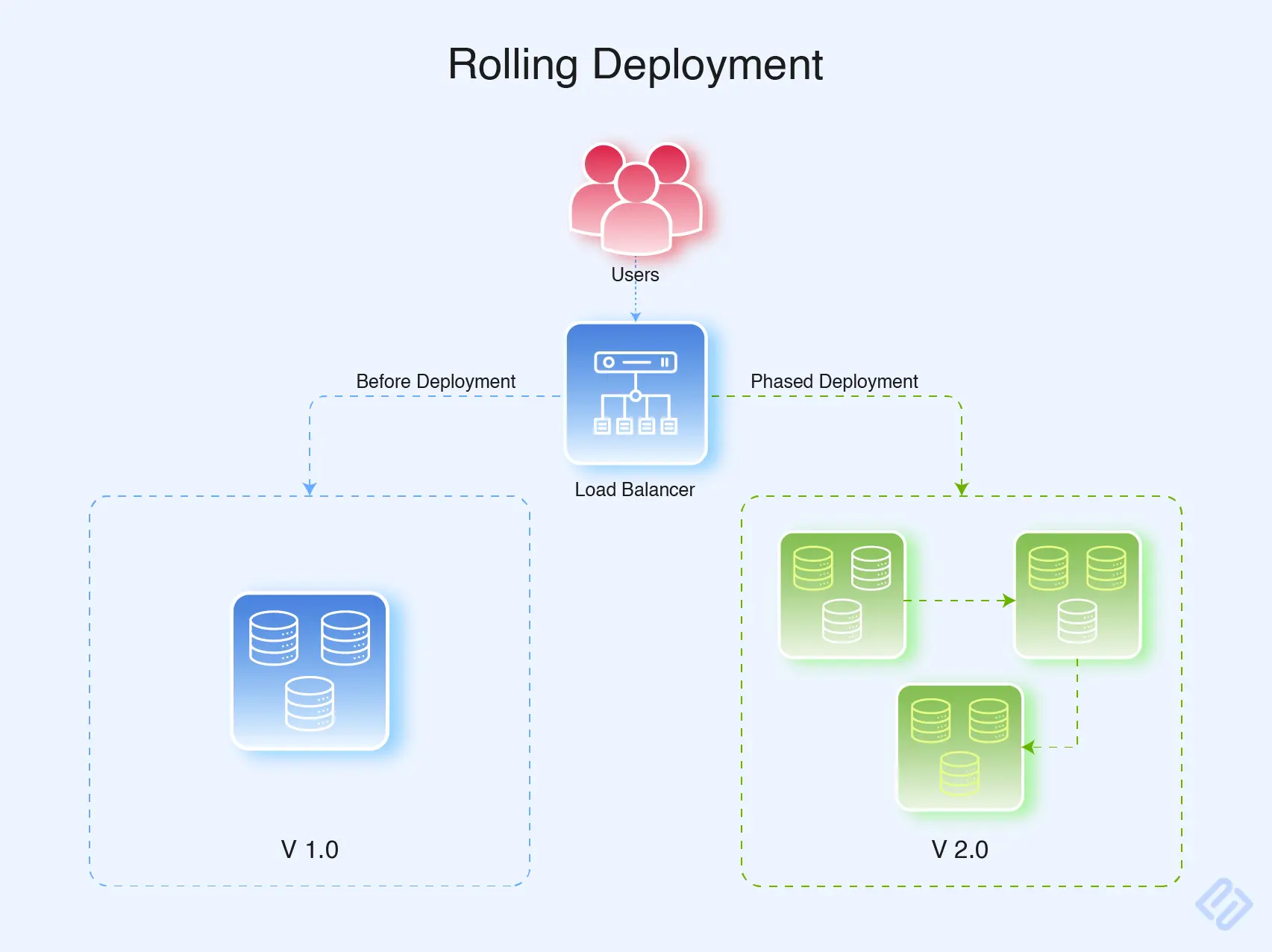
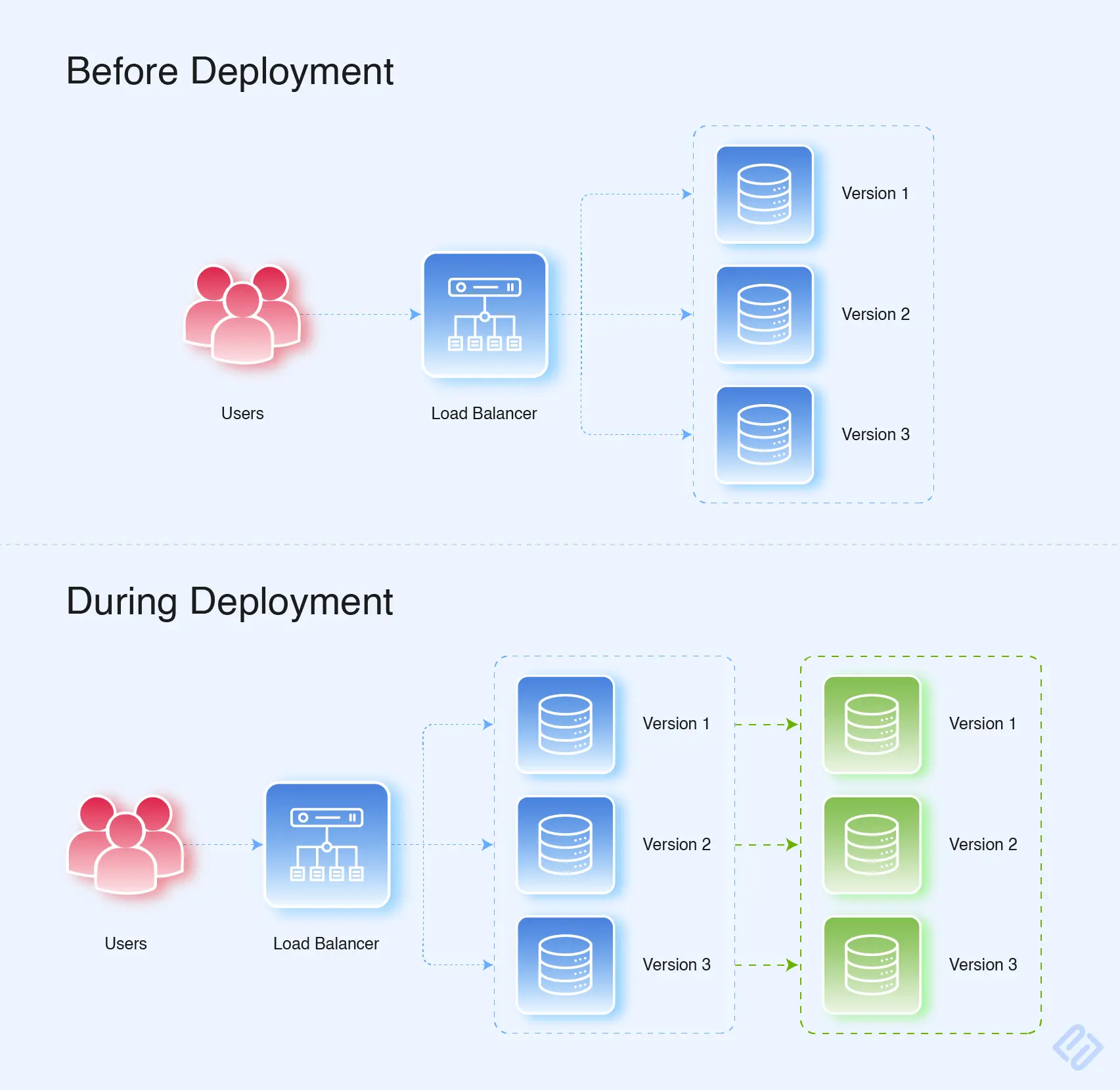
Rolling deployments push the new build out in a gradual way rather than a massive rollout. It's a lifesaver for enterprise apps. It keeps downtime at zero and lets you monitor the performance. If a bad bug slips through, you just rollout and revert.
3. Blue-Green Deployment
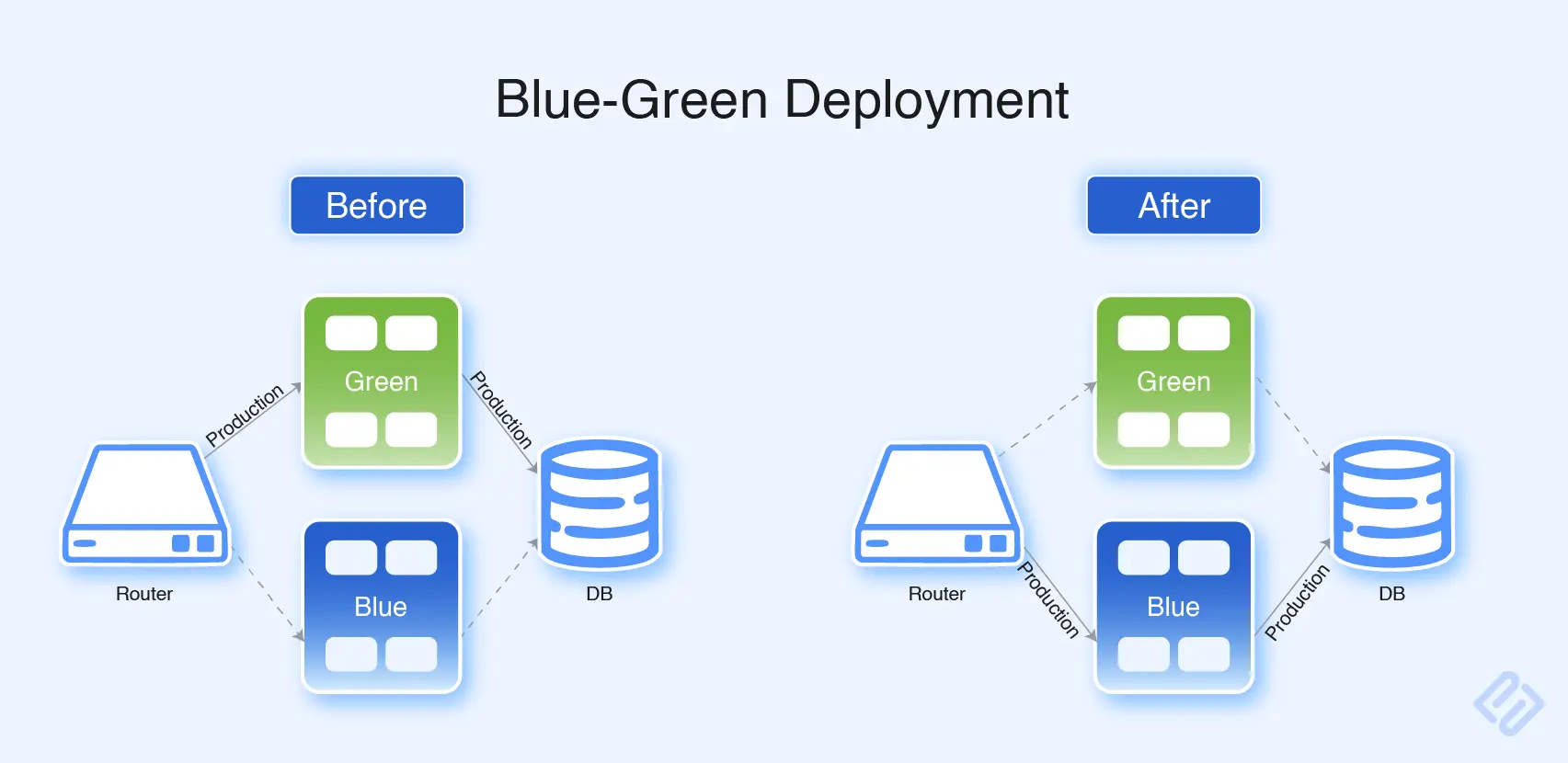
Blue-Green deployment is when the team maintains two replicas of the production environment. One has an existing version which we call "blue." The other one is called green. After the newer version is successfully tested on the green server, traffic is shifted to the green server, which can help roll back if any problem occurs.
4. Canary Deployment
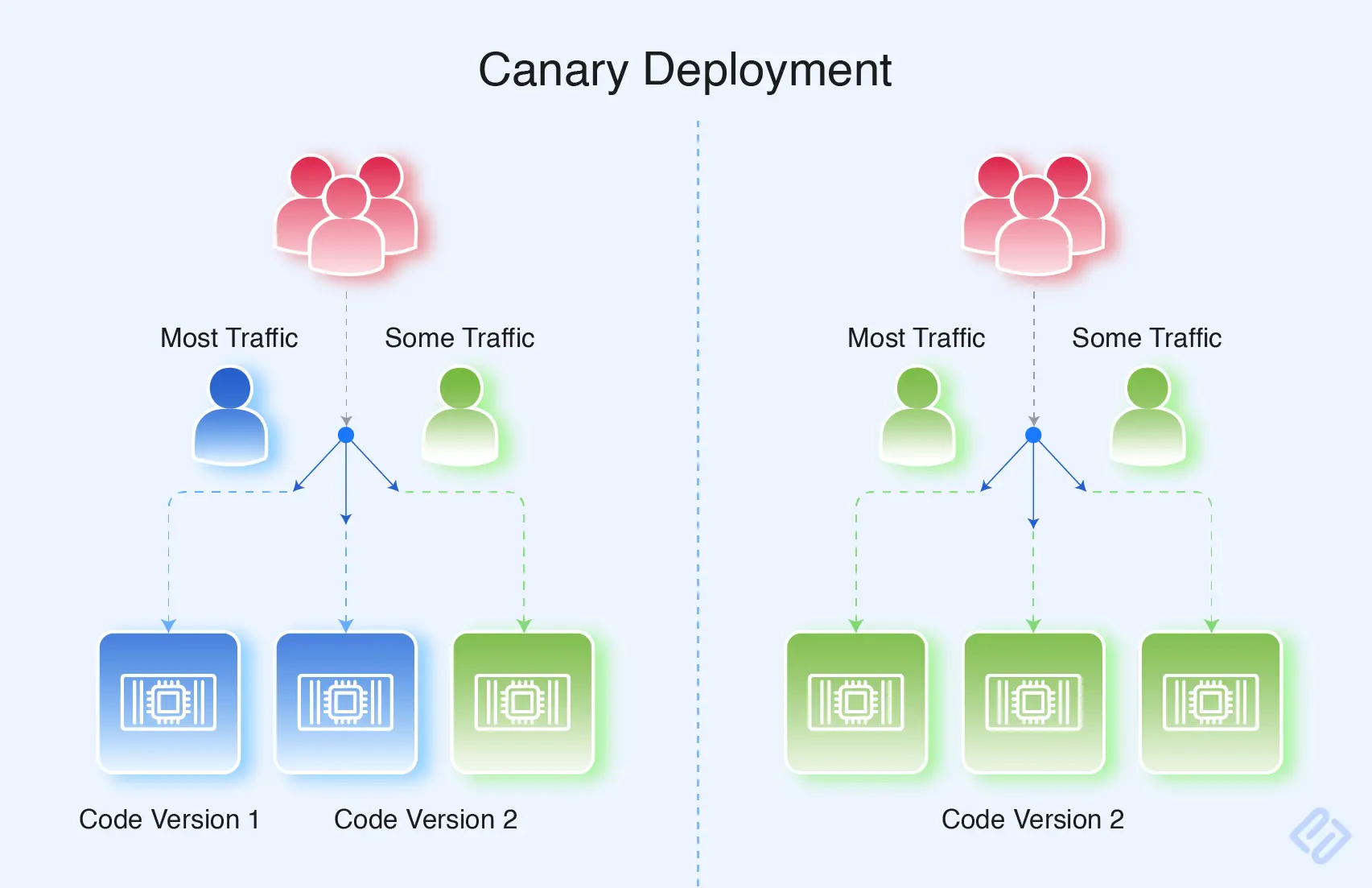
Canary release is the way to deploy a particular version of the application to the environment where it is used by the users have access to it before its full implementation. Such a type of deployment enables those who are responsible for the applications to test its performance and get feedback from it without making the problem noticeable for other people. If the canary version works well, then it may be used on all other users.
5. Shadow Deployment Strategy
Shadow deployment is the parallel deployment of the updated version of the software application beside the current version; but in a way when this new version is not available for the users. Traffic is sent to both versions. It provides developers with the opportunity to gather performance data and evaluate new features.
The Software Deployment Process
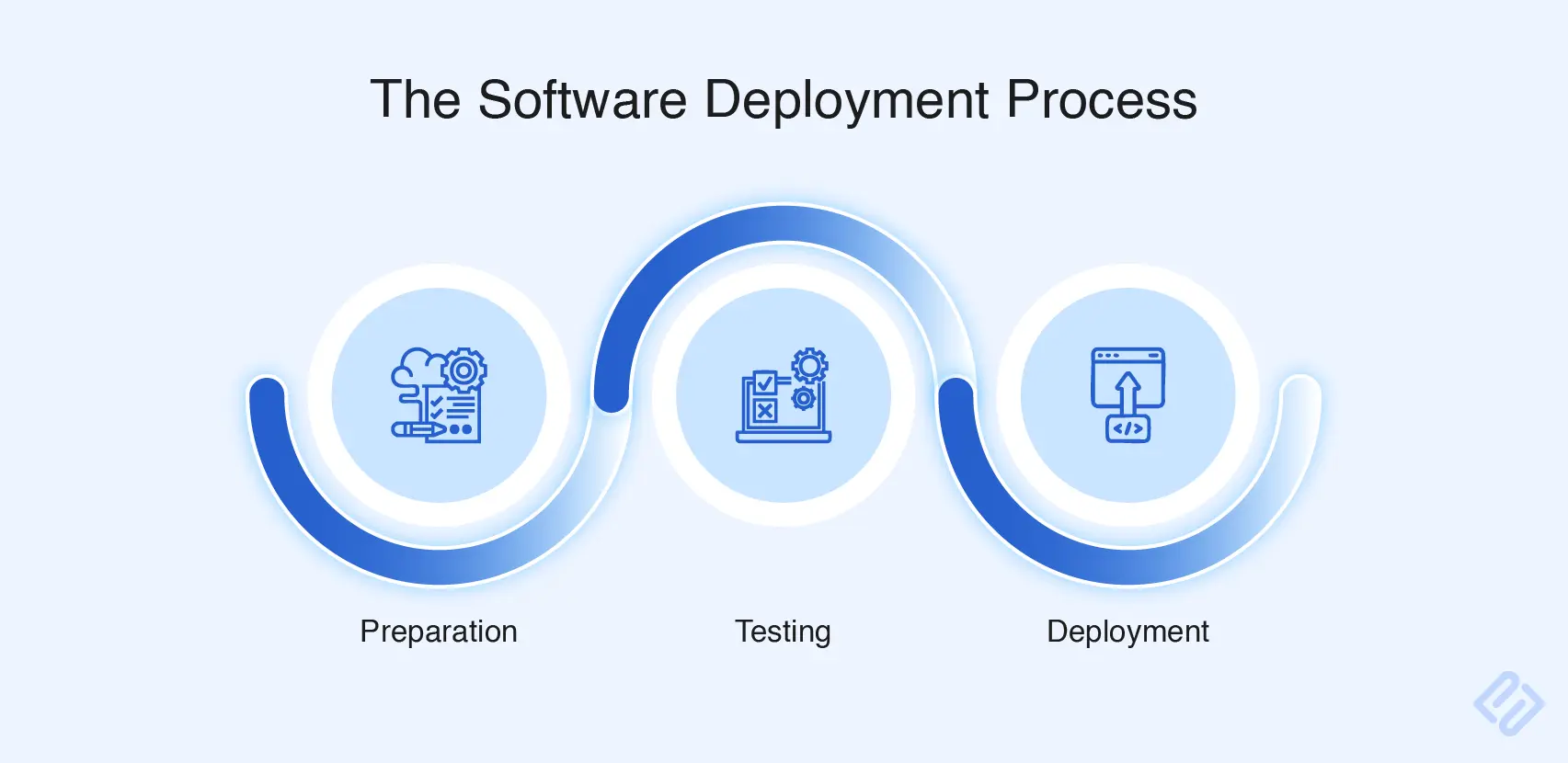
Preparation
This stage is your pre-flight checklist. You map out the launch strategy, prep the target environments, and stress-test your infrastructure. In this stage, your team scrub the documentation, write down the configuration details, and backup route in case the launch falls apart.
Testing
Testing is checking small bits of code employing standard testing techniques. It involves a semi-automated testing strategy, blending tools-driven automated testing for predictable processes, and human-led testing for complex scenarios. Modern testing is more about automating as much as testing by using the latest technologies.
Deployment
When new software is ready, it goes live so real people can use it. The team rolls out the update in stages, or runs it alongside the old version to make sure it is safe. During the launch, they change settings, move data, and watch everything closely. Finding bugs and listening to user feedback right away helps them fix problems fast. If a major issue pops up, the team can use a backup plan to switch right back to the old, working version.
Best Practices for Software Deployment
- Automate the Deployment Process: Manual deployment is most of the time inconsistent. Modern teams use CI/CD pipelines (e.g., GitHub, Actions, GitLab, CI, Jenkins). It doesn’t only speed up the QA in the software testing process but also reduces human errors.
- Implement Version Control: It creates a safety net for your work. If something breaks, you can instantly revert to a stable state. Plus, you maintain a good habit of tracing your changes – like who made, when change was made, why it was introduced – by implementing it. Git is a standard version control system used widely in modern development.
- Thorough Testing Prioritize: App crashes account for 71% of uninstalls. Execute Rigorous QA testing by thoroughly testing your software in a simulated real-world scenario. This is an essential step to safeguard your brand’s reputation.
- Have a Rollback Plan: it is an absolute industry standard in software engineering. It is a documented plan outlining a strategy to revert in the event of a major issue.
- Monitor Performance and Feedback Implement: Post deployment monitoring is an industry-standard practice of tracking what happens after your app reaches your servers.
- Schedule Deployments at Off-Peak Hours Deployments: Schedule deployment during off-peak hours. It minimizes disruption.
- Communicate to Stakeholders Keep all stakeholders: informed throughout the deployment process. Communicate downtime, new features, and changes that will affect users. Clear communication breeds trust and prepares the users for transitions.
- Documentation of the Deployment Process: Keeping a thorough record of how the deployment was done together with configurations, scripts, and environment details provides consistency and helps onboard new members of a team. It further aids in troubleshooting and future deployments.
Final Thoughts
Software deployment success will result in creating applications that is secure, reliable, and efficient in the real world. Thus, software deployment involves three important phases, preparation, testing, and deployment that include various methods, including basic, rolling, blue-green, canary, and shadow deployment.
Effective deployment requires your bespoke software development company to follow expert-outlined best practices. They are also referred to as standard or best practices. Knowing about these nuances as mentioned in the best practices section in this blog and implementing appropriately will help to optimize software deployment.